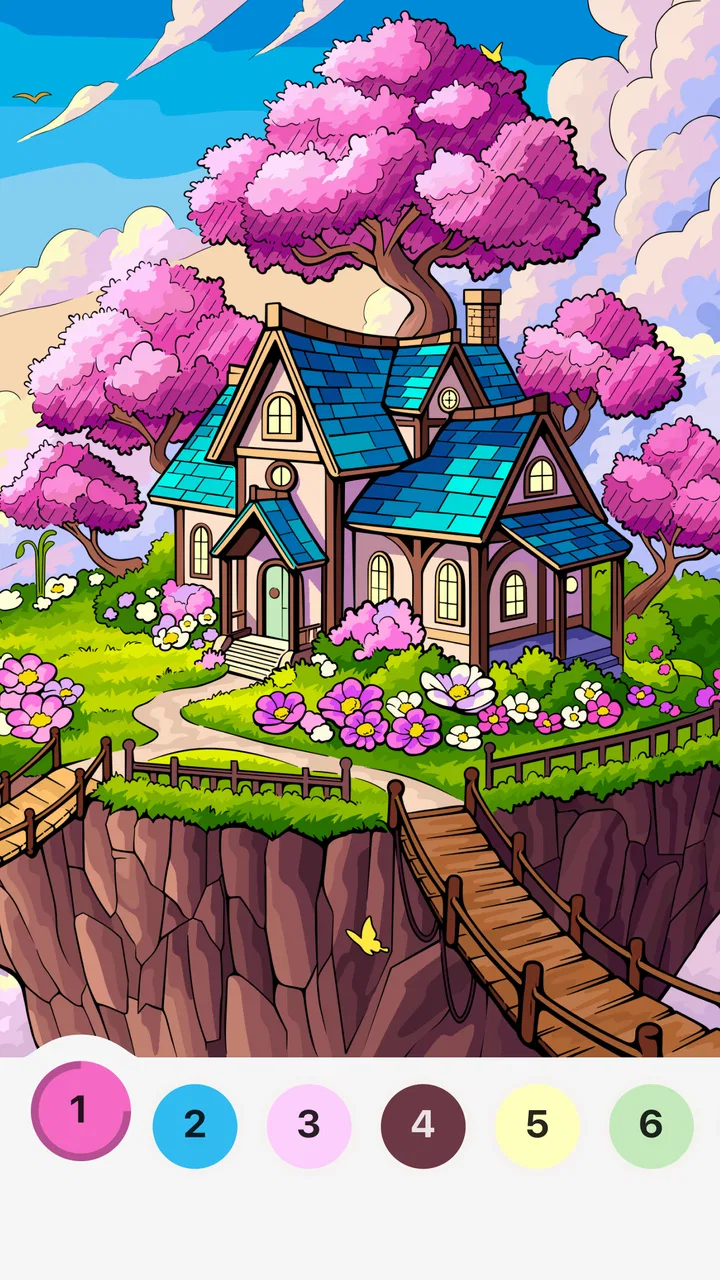
Harbor Color - Your Cozy Home
- 4.7
- Rating
- 100.00K
- Installs
- Free
- Price

 Analysis by App-foxy
I opened Harbor Color expecting a quiet board game with a coloring twist, and that is the right general way to approach it. This is a free game from Sunny Lamb Studio built around peaceful home scenes and relaxed coloring rather than competition, timers, or complicated rules. Its appeal is simple: choose a scene, spend a few minutes filling it in, and let the activity slow your attention down.
That simplicity is also the key to judging it fairly. I would not install this looking for a deep strategy game, a long campaign, or the kind of challenge that keeps demanding better scores. I see it more as a small digital pause for people who enjoy arranging colors and completing visual details. The experience fits naturally into a quiet evening, a short break, or a moment when I want something interactive without having to learn a system first.
How Harbor Color feels in ordinary use
The game’s presentation is centered on cozy domestic imagery. Instead of sending me into a battlefield, a racing track, or a fantasy map, it places the focus on home-like scenes and the calming act of coloring them. That choice gives the game a distinct mood within the board category: it borrows the accessible, turn-free interaction of casual puzzle games while keeping the emotional tone of a coloring book.
You May Also Like

 Blood Strike: 2.5 Anniversary
Blood Strike’s Loadouts Turn Every Drop Into a Tactical Gamble
A close look at Blood Strike’s custom loadouts: how fast access to signature weapons reshapes its battle royale rhythm, rewards preparation, and narrows the gap between fights.

 Pandora - Music & Podcasts
Pandora’s Music Is Easy to Start, but Harder to Recover
Pandora’s strength is its low-effort path from a seed to a station. Its weak spot is how much confidence it asks you to place in connection, setup, and quiet recovery.

 8 Ball Pool
 Is Built on Rivalries, Rematches, and Routine
A close look at the rivalries, rematches, shared routines, and unanswered safety questions that turn a quick pool match into a persistent mobile community.

 Samsung Music
’s Quiet Strength Is Playing What You Already Own
Its reach comes less from spectacle than from dependable access to a personal library. That simplicity is both the app’s strongest retention engine and its ceiling.

 AccuWeather: Weather Radar
AccuWeather Review: A Quick, Clear Forecast for Everyday Decisions
For everyday plans, the best forecast is the one you can understand quickly. AccuWeather makes rain timing, radar, and local conditions easy to act on, with a few trade-offs.

 Hill Climb Racing
Why Hill Climb Racing Still Turns Crashes Into One More Run
A tiny car, a bumpy hill and one more upgrade: Hill Climb Racing keeps resurfacing because its simple chaos makes every near-miss feel personal.
More From Our News Desk



I found the strongest part of the concept in its low mental demand. There is no need to plan several moves ahead or remember a complicated set of rules. The main decision is visual: which part of the scene should receive attention, and which colors make the finished picture feel right to me? That makes it approachable for someone who rarely plays games, including a family member who might find conventional board games too competitive or too rule-heavy.
The store summary describes the experience as finding calm through designed home scenes and relaxing coloring moments, and that is a useful description of its purpose without turning it into something more ambitious than it is. The short store description, “Harbor Color,” is equally direct. The game is not hiding behind a large fictional premise; its identity comes from the atmosphere and the coloring activity itself.
Because the interaction is so gentle, I would use it differently from a normal board title. With a strategy game, I usually sit down with a goal of winning. Here, I would open it with a goal of settling into a rhythm. That distinction matters when deciding whether it is worth keeping installed. If I want quick relaxation, the design makes sense. If I want a strong sense of progression or a demanding reason to return, the same restraint may feel limiting.
A practical way to use it during a busy day
A realistic use case is a short break after work. I might have ten minutes before cooking dinner, but not enough energy for a competitive match or a story game. A coloring session gives me something to do with my hands while keeping the attention level low. I can focus on a small area, finish what I started, and stop without feeling that I have abandoned a team or wasted a long setup.
It can also suit a quiet bedtime routine, although personal sensitivity to screen use still matters. The calm subject matter is more suitable for winding down than an action game, but the phone remains a phone, so I would keep the session brief and lower the display brightness if I were using it late. That is not a special feature of the game; it is simply the most sensible way to fit a screen-based coloring activity into a restful routine.
One useful habit is to treat each scene as a small creative exercise rather than rushing toward completion. I would first choose a broad color mood, such as warm, cool, or neutral tones, then fill the larger areas before working on details. This approach makes the result feel more deliberate and prevents the session from becoming a repetitive tap-through task. The game’s calm premise works best when I give myself permission to make choices instead of treating every color as a correct answer.
What the free price means for value
Harbor Color is free, so the basic decision is easier than with a paid board game. I do not need to justify an upfront purchase before discovering whether the atmosphere suits me. For a person who wants a no-cost coloring experience on a phone or tablet, that makes the game immediately accessible and lowers the risk of trying it.
At the same time, free access should not be confused with unlimited value. The real question is whether the available experience gives me enough variety and comfort to remain useful after the first few sessions. I would judge that by how often I can return to the scenes without feeling that the activity has become mechanical. Since the game’s value comes from repeated calm moments rather than a single dramatic finish, replay appeal matters more here than the novelty of the first opening.
I also appreciate that the free price changes who can reasonably recommend it. A parent looking for a gentle activity, a casual player testing a new category, or someone who enjoys coloring but does not want to buy a dedicated app can all try it without making a financial commitment. Conversely, a player who normally measures value through hours of progression, competitive depth, or a large collection of systems may find that “free” does not compensate for a lack of the kind of content they personally want.
There is no reason to describe it as a bargain in the same way I would describe a paid premium game. A free title can be valuable because it fills a narrow need well: a few calm minutes, an easy creative outlet, or a low-pressure activity. That is the standard I would use here. If it gives me a pleasant pause without asking for money, it has delivered useful value even if it never becomes my main game.
Where it stands beside familiar alternatives
Compared with traditional board games, this is much easier to enter. A physical board game usually needs other players, table space, setup, and a willingness to follow rules. Harbor Color removes those barriers and lets me begin alone. That makes it a better fit for solitary relaxation, but a worse replacement for the laughter, negotiation, and social energy of playing around a table.
Compared with competitive mobile board games, it is gentler but less motivating for anyone who enjoys opponents, tactics, or a clear win condition. I would choose a conventional digital board game when I want to test decisions or play with friends remotely. I would choose this one when I do not want to compete at all. The two styles serve different moods rather than directly replacing each other.
It also differs from a general coloring app. The home-scene focus gives the experience a more consistent identity than a random collection of pictures might have. That can make it feel cohesive, especially if I enjoy interiors and familiar domestic settings. The trade-off is that someone who wants animals, landscapes, abstract patterns, or highly varied subjects may prefer a broader coloring library elsewhere.
Against a paper coloring book, the phone version is more convenient because I can carry it everywhere and begin instantly. It is also less tactile: there is no paper texture, pencil pressure, or physical page to keep. That difference is important for people who use coloring as a break from screens. For me, the digital format wins on convenience, while paper remains more satisfying when the goal is to disconnect from devices completely.
Small techniques that make the experience better
My first recommendation is not to color every area with the most obvious shade. Home scenes can look flat if every object receives an isolated, unrelated color. I would pick a small palette and repeat one or two tones across different parts of the image. Reusing a color in a cushion, ornament, wall detail, or piece of furniture can make the final scene feel connected, even when the game itself is designed for casual play.
My second tip is to use the larger shapes as anchors. I would start with the wall, floor, or main furniture rather than tiny decorative elements. Once the dominant areas establish the mood, the smaller choices become easier. This also creates a satisfying visual change early in the session, which is useful when I only have a few minutes and want to see clear progress before putting the phone down.
A third insight is that the game can work as a transition activity, not only as entertainment. I would use it between demanding tasks rather than during moments when I need to multitask. Coloring requires enough attention to interrupt a stressful thought, but not so much that I need to prepare mentally. That makes it more useful than scrolling when I want a deliberate pause, while still being lighter than a full game session.
For children or younger players, the Everyone content rating makes the game broadly approachable. I would still decide whether the individual child is ready for independent phone use, since an age label does not replace supervision or family screen-time rules. For adults, the same rating signals that the tone is gentle rather than mature or intense, which is consistent with its cozy presentation.
The limitations I noticed before recommending it
The biggest limitation is the narrowness of the central activity. If coloring home scenes is not already appealing, there is not much else here to pull me in. A player who needs puzzles with escalating difficulty, strategic choices, or a strong narrative may quickly feel that the game is too passive. I would not recommend it as a universal board-game substitute because it serves a very specific emotional purpose.
There is also a risk of repetition. Coloring can be soothing precisely because it follows a familiar rhythm, but that same rhythm can lose its charm if I expect constant novelty. The more I look for new mechanics, the less satisfying the simple format becomes. I would keep this installed as a companion game, not necessarily as the only game on my device.
The digital format creates another trade-off. A phone is convenient, but notifications, small touch targets, and the temptation to switch apps can interrupt the calm. I would get the best result by turning on a quiet mode and giving the session a defined start and end. Without that boundary, the game can become just another brief phone interaction rather than a genuinely restful break.
I would also be cautious about recommending it to someone who wants a social experience. Nothing about the core concept suggests that its main purpose is conversation, teamwork, or friendly competition. A multiplayer board game is a better choice for a family gathering or a game night. Harbor Color is strongest when I am alone and want the environment to stay peaceful.
Device fit, accessibility, and expectations
The game supports devices running Android 6.0 or later, which gives it a broad compatibility range for people using older Android hardware. That is useful if I want to place it on a spare phone or a less powerful family device rather than reserving it for a recent flagship. I would still expect the visual experience to depend on the particular screen and touch responsiveness, especially because coloring benefits from seeing small areas clearly.
The current version is 1.0.2, and the game was released on January 28, 2026. Those details place it in an early stage of its life, so I would approach it as a focused experience that may evolve rather than as a long-established platform with years of accumulated systems. I would keep expectations centered on what the game already does well: calm coloring in home environments.
Its early presence has nevertheless attracted a positive response, with an average rating of 4.8 from around 500 ratings and more than 10 thousand installs. I treat those figures as encouraging rather than conclusive. They suggest that the mood is connecting with its initial audience, but a rating cannot tell me whether the game matches my personal tolerance for repetition or whether its scene selection will hold my attention.
The content rating of Everyone makes it easier to consider for mixed-age households, and the free price removes a major barrier to trying it. Those are practical advantages, not proof that every player will enjoy it. The right question remains whether a quiet, home-focused coloring activity is something I would actually open when I have a spare moment.
Who will get the most from it
I would recommend Harbor Color to people who like visual organization, gentle creative tasks, and games that do not punish mistakes. It is especially suitable for a player who wants to relax without learning rules, competing against a clock, or committing to a long session. Someone new to mobile games may find the concept easier to understand than a typical board title because the purpose is immediately visible.
It may also suit people who enjoy interior imagery and prefer a consistent atmosphere. The home-scene theme gives the game a warmer personality than a purely abstract coloring tool. If I wanted a small activity that felt more like visiting a series of cozy rooms than solving a formal puzzle, this would be a sensible option to try.
I would skip it if my main goal is challenge. Players who want tactical depth, ranked matches, complex progression, or a story with major decisions will probably be happier with a different board or puzzle game. I would also skip it if I am specifically trying to spend less time looking at screens; a physical coloring book would better match that goal, even though it is less convenient to carry and begin.
For families, I see it as a calm individual activity rather than a replacement for shared play. Two people could sit together and compare their creative choices, but the value comes from the coloring itself, not from a built-in social contest. That distinction helps avoid disappointment: it can occupy a quiet moment, but it is not designed to create the same interaction as a tabletop game.
My final recommendation
After trying to place it in everyday use, I see Harbor Color as a focused free board game for calm, low-pressure coloring. Its strongest value is accessibility: I can try it without paying, understand its purpose quickly, and use it in short sessions. The home-scene setting gives the activity a recognizable character, while the simple format makes it suitable for casual players and people who do not normally consider themselves gamers.
My recommendation comes with a clear condition. Install it if you want a quiet creative pause and are comfortable with an experience built around repetition and atmosphere. Skip it if you need strategy, social play, a strong progression system, or a reason to keep mastering new mechanics. In those cases, a conventional digital board game, a deeper puzzle title, or a paper coloring book would be a better match.
For me, the game earns its place as a small companion rather than a complete entertainment package. I would open it after a demanding task, choose a comfortable palette, finish part of a home scene, and stop before the activity becomes routine. Its value is not in doing many things; it is in doing one gentle thing well enough to make a short break feel intentional.
Sunny Lamb Studio has chosen a modest idea and presented it with a clear emotional direction. With its free access, Everyone rating, broad Android compatibility, and encouraging early reception, it is easy to recommend as a low-risk experiment. Just keep the scope in mind: this is a coloring-focused retreat for quiet moments, not a substitute for every kind of board game.
FAQs for Harbor Color - Your Cozy Home
01What is Harbor Color - Your Cozy Home, and what does it offer?
Harbor Color - Your Cozy Home is an interior design app designed to help users visualize color changes in their living spaces. It offers a range of tools to try out different paint colors on walls, furniture, and decor. The app includes a virtual palette, real-time visualization, and personalized recommendations to create a cozy home environment.
02Is Harbor Color - Your Cozy Home available for both Android and iOS?
Yes, Harbor Color - Your Cozy Home is available for both Android and iOS platforms. Users can download the app from the Google Play Store or the Apple App Store. The app is designed to provide a seamless experience across different mobile devices, ensuring accessibility for a wide audience.
03Does Harbor Color - Your Cozy Home require an internet connection to function?
Harbor Color - Your Cozy Home does not require an internet connection for basic functions like color selection and visualization. However, to access features such as personalized recommendations and content updates, an internet connection is necessary. This allows users to explore the latest trends and receive tailored suggestions.
04Are there any in-app purchases or subscriptions in Harbor Color - Your Cozy Home?
Harbor Color - Your Cozy Home offers a free version with basic features. However, for users seeking advanced tools and an ad-free experience, there are optional in-app purchases available. These premium features include exclusive color palettes, expert design tips, and enhanced customization options to elevate the user experience.
05How user-friendly is Harbor Color - Your Cozy Home for beginners?
Harbor Color - Your Cozy Home is designed with an intuitive interface, making it highly user-friendly for beginners. The app includes tutorials and a straightforward navigation system, allowing users to easily explore and utilize its features. Whether you're a design novice or an enthusiast, the app caters to all levels of expertise.
Pros
- Intuitive interface for easy navigation.
- Wide variety of color options available.
- Customizable themes for personalization.
- Smooth performance with no lag.
- Offline mode for uninterrupted usage.
Cons
- Limited free features without subscription.
- No direct social media sharing options.
- Occasional ads in the free version.
- Requires frequent updates for new features.
- Lacks integration with smart home devices.

Harbor Color - Your Cozy Home
Gallery